Youtube is the most visited website in the world, has an average of 89M daily users and approximately 158,000 minutes uploaded per minute. It's a very close medium to the public, that's why we can get a lot out of it.
In this tutorial we explain EVERYTHING you need to know about seo for Youtube, explaining each point step by step and guiding you to the end. All seo strategies and/or techniques for youtube are updated and effective.
Goals of doing seo on Youtube
Before starting with seo for Youtube you must ask yourself a series of questions to be able to establish goals and reach your target audience:
- Who do I want to reach
- What theme will my videos have
- How will I monetize my channel
Once you have these three points very clear, you'll already have the "base" to start with Youtube SEO positioning.
I can't influence the first or second point but I can the third, that's why I'm going to show you the different ways to monetize a youtube channel that exist today:
Monetize with adsense
Monetizing a channel with adsense is the most "typical". It consists of earning money thanks to AdSense ads that appear on YouTube.
- Depending on the theme and target country they'll pay you more or less.
- If you're not an "influencer", it will be insubstantial.
You need to have more than 100,000 real subscribers and 4,000 hours of annual playback.
RECOMMENDATION: Upload some long videos at the beginning to reach 4,000 hours of annual viewing.
Sponsors
Getting sponsors isn't an easy task, it consists of collaborating with brands that pay each time you upload a video talking about them.
It's interesting whether you reach a lot of people or a few hundred. If your channel isn't very popular, you can always contact different businesses or brands you can promote (of your same theme) at a low cost. As you become more famous, businesses will be the ones who contact you to sponsor them. Although if you get to this point, you've done too well!
Sell my own products
A good way to monetize Youtube is to sell products. In this case, obviously, if you don't have any product to offer, it doesn't interest you.
Get a good job
If your videos are quality (which they should be) and you reach "x" people, they will recognize your knowledge and can carry out different actions like hiring you or giving you work.
Offer services
Same as the previous point, by showing your knowledge through videos, you can reach an audience that decides to hire your services. The type of content for this monetization method should be: Infoproduct/Course, talks, training sessions, advisory, etc.
Steps to achieve good seo positioning for Youtube
1. Configuration and optimization of your channel
2. Keyword typologies for the video title
For positioning videos on youtube it's extremely important to take into account the keyword typologies of each video's title before getting into other topics.
I'm going to show you the two types of typologies that exist:
Temporary or viral
These are words that are trending for a while and finally disappear (have no searches). They have a greater capacity to go viral with clickbait instead of keywords and increase the channel's retention time if they're entertaining but as I said, for a predetermined time. The positioning on youtube of many accounts is based on this typology although if what you want is something timeless, that doesn't expire, you'll have to use evergreen words.
Example: Best play game of 2021
Evergreen (timeless)
Evergreen keywords are timeless, this means they will hardly stop having searches (they have recurring organic traffic). For seo on youtube it's the most ideal as long as we think long-term.
Example: How to make cotton candy.
3. Keyword study with seo for youtube
Each search engine has its own keywords so doing a keyword research for google is NOT the same as doing it for Youtube.
Through keywords we will be able to know how users are searching for what we want to offer them, in this case, the video we want to position.
For example, if we want to make a video on "how to make a chocolate cake", we'll have to search and know the words people use to search for this type of video. This way, we can optimize our video with these words so it appears in top positions for them..
1. Use planner tools
special keywords for youtube
Any word planner won't work for us since most are oriented to Google searches. In this case, we need tools specialized in youtube searches. I'll leave you a list with the ones I consider best:
- Keyword generator (ahrefs)
- Keyword shitter
- Answer the public
- Keywordtool.io (the one I use)
2. Study the competition
to copy and improve video ideas
This is a quick and effective trick (to see what works best on other channels). It's important to see the visits and engagement a video has. Although the video looks crafted and with SEO, if it doesn't have visits, it's probably not worth making an equal or better one.
3. Get value from the free version
of the BUZZSUMO tool
The free version of BUZZSUMO will give us sources of inspiration, when we put a keyword it will return the articles that have the most engagement and most social media sharing. It's a very important factor for the seo algorithm on Youtube as long as we want that virality factor with some topic that wants to cause people's interest.
4. Research current trends
This tip will help a lot since we know what type of trends are current, so we'll adapt to them. To see trends, simply head to the left sidebar and click "trends" on the Youtube desktop (the initial screen).
5. Use the competencies of the youtube search engine itself
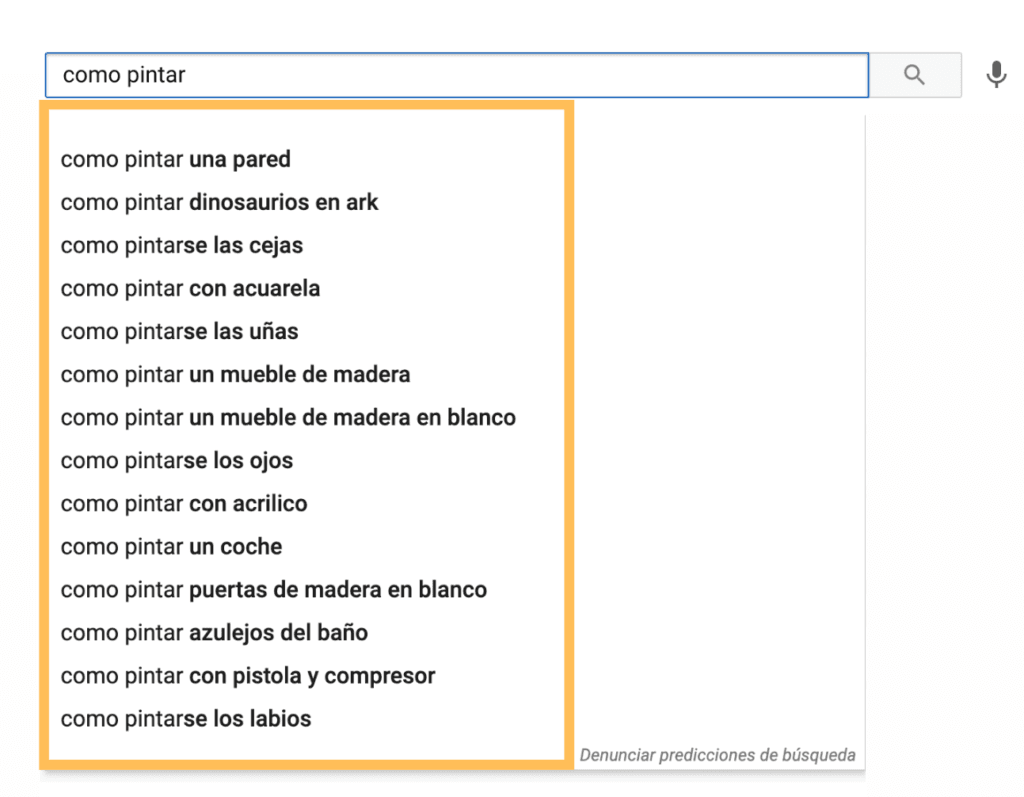
Same as on google, search engine suggestions will help us improve seo for Youtube videos. It will give you new keyword ideas that you'll probably be able to use.
4. Title optimization
For Youtube positioning, titles are one of the most important and influential parts for the algorithm. That's why I'll leave you all the techniques you have to use to improve seo for youtube.
1. Search intent
For creating a good title it's fundamental to understand the potential visitor's needs by comparing it with current video titles:
What does the user want to find? = What is positioning now?
For that, we will follow these steps:
- Do a search for the word you want to position
- What is the title like?
- What is the video like?
- How long does it last?
- What words does it use?
- Replicate and improve it
2. Put the keyword at the beginning of the title (and synonyms if needed)
It seems absurd but it's a good technique, whenever you can put the keyword at the beginning of the sentence. Obviously (we'll see later) it won't matter to put an emoji before the keyword, it won't take away its strength and Google will still treat it as if it were at the beginning.
3. CAPS AND EMOJIS: Draw more attention and increase CTR
A way to increase ctr is using caps and emojis in titles. With this technique we'll get to draw the user's attention and divert their view to our video.
My advice is to put what interests the user to read (usually the keyword) in caps and at the beginning of the title an emoji compatible with youtube titles.
4. 60 characters maximum so it doesn't get cut
The youtube seo title should not have more than 60 characters because if exceeded, the title will look cut off, with the three dots "…" and that's not cool. This point isn't as related to video positioning on youtube but if not met, it can take points off when positioning the video on Youtube.
5. Don't do keyword stuffing
Don't think that by repeating the keyword many times and getting high density for it you'll position the video on Youtube. On the contrary, it will realize you're trying to manipulate the algorithm and won't position you as well. In fact, if you do it often it can sanction you.
Positioning Youtube video with keyword stuffing is a mistake.
6. Find ideas: with the keyword planners seen previously
We have many tools to do keyword research (I mentioned them previously). It's essential to look for keyword ideas with these tools since we can go to position more than one keyword for the same video and reach a broader target audience.
7. Sow doubt to tempt them to enter:
Example ..."and this happens!"
When you see a title that leaves you in doubt, don't you feel like watching the video to know what happens?.
At least me, I either watch it or I burst lol.
Sowing doubt is a very good practice in some types of videos for seo on Youtube, although it's not always possible.
5. Optimize the video description
1. Keyword at the beginning
It seems unbelievable but putting the keyword at the beginning of the description will help us a lot to position our video on Youtube for that keyword. It doesn't have to be right at the beginning, but in the first - second sentence.
2. Links at the end
It's always convenient to put links (at the end) to increase visibility, whether from external sites or other videos.
Normally I put the website, social networks and some related video.
If you use bit.ly, you'll be able to see how many people have clicked (putting a "+" at the end of the URL) more easily than with Google analytics.
3. Give reasons to click
Draw attention and put exactly what the user is looking for so as soon as they see the description they know your video is just what they were looking for.
4. Maximum 5,000 characters
You can add 5,000 characters maximum (usually not that much is needed) but what's important are the first lines.
5. Include timestamps
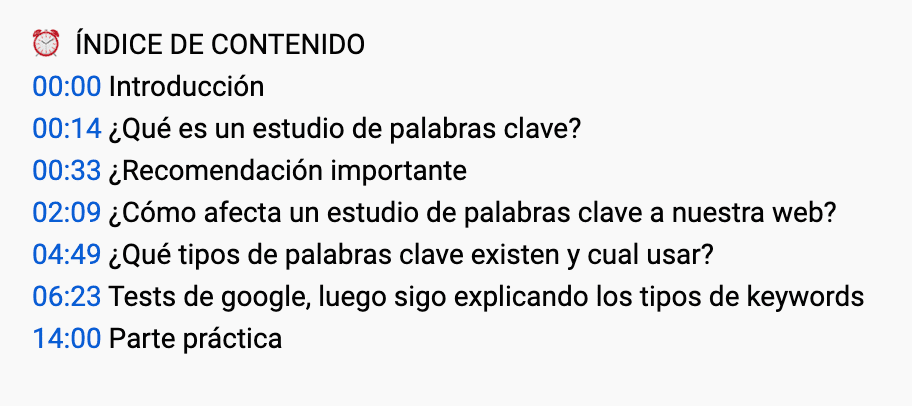
For those lazy users or those who only look for something specific. Not only to improve SEO on Youtube but also to give a better user experience. This "trick" is essential if you want to position your video on youtube.
6. Invite reading
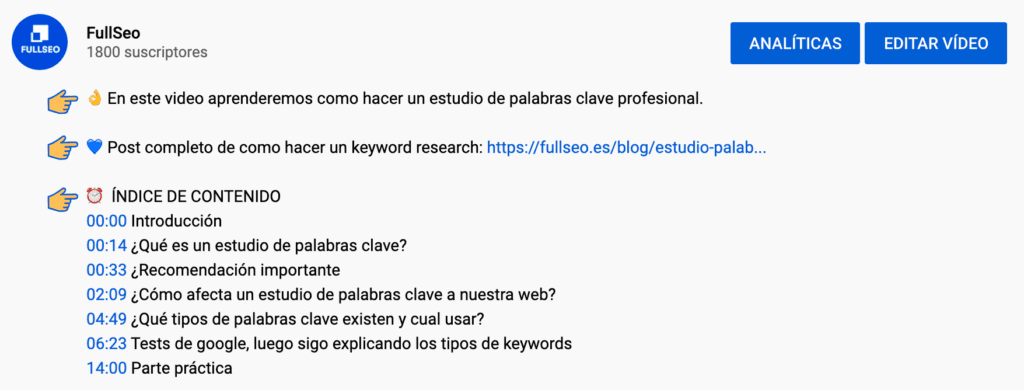
An attractive layout that doesn't make reading a drag, use short sentences, easy reading and elements like emojis and hashtags.
6. Optimize tags
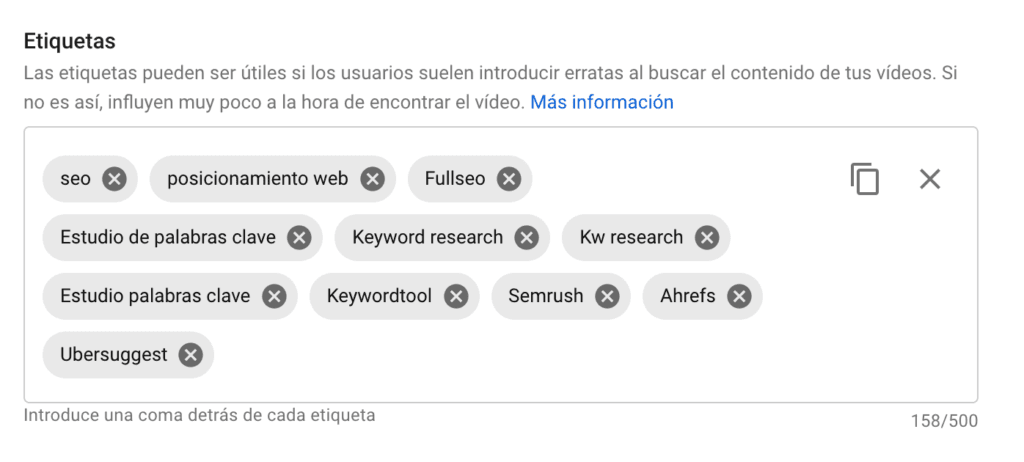
Tags influence and are important for the Youtube algorithm, although increasingly less directly.
1. Use main keywords: Those you see in SEO tools, or those that come to mind.
2. Copy the tags of competent videos: With extensions like VidIQ or TubeBuddy. This will also give you more chances of appearing in suggested videos of the competition whose tags you copy, which will give you more visibility within the YouTube platform.
7. Generate interaction
Interactions can help improve positioning for Youtube since the algorithm likes a video with likes more than without (because it sees it as more useful and gives it more value among other things) but this point is more oriented to reputation. Having good comments, likes and followers will help to have a good reputation and make the YouTube algorithm understand that it should position our channel since it's quality.
Interactions can be:
- Likes/Dislikes
- Subscribers
- Comments
1. Ask for interaction yourself
Ask for likes, that they subscribe, that they comment and click the bell. I normally do it both at the beginning and end of the video. If it's very long, you can also ask for it in the middle but always without demanding anything, being humble and thanking.
2. Put graphics
An animation where the buttons appear and it seems like a mouse subscribes and activates the bell.
3. Make a series
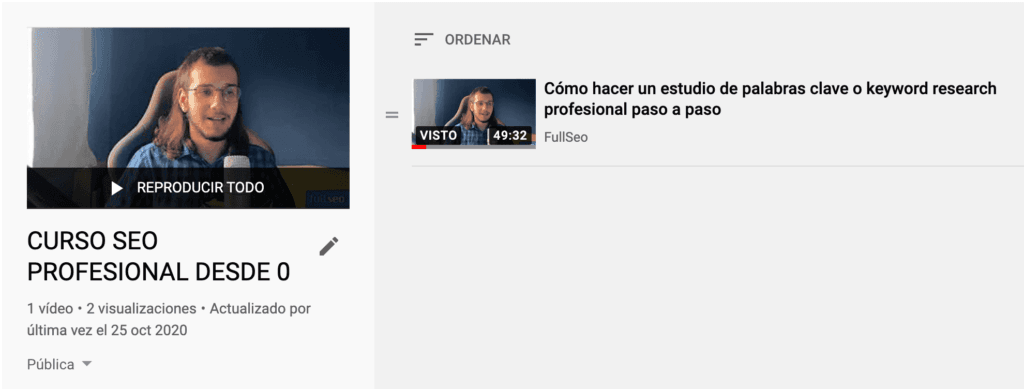
You can do the typical "the next video unlocks if this one reaches 'X' likes". That said, as long as they're quality videos, otherwise it won't work for you.
In a series (and in any other video) you shouldn't repeat intentions or keywords, each one must have its own individual keyword.
4. Never buy likes, followers or anything similar
I used to buy likes and visits on secondary channels... and goodbye to almost all the videos. Each time the Youtube algorithm is smarter and knows how to detect this type of bots, if you do it and they catch you, they can close your channel radically.
5. Create premieres
This way there will be more people watching your video from the first moment and then it will position the same as a normal video.
8. Subtitle optimization
Subtitles can provide more information about your video to youtube visibility systems
You can upload them manually or have Youtube detect them automatically. Obviously the Youtube algorithm values and positions a video with subtitles better than without.
9. Optimize video cards
This point is quite focused on SEO since we're not only asking for a like but asking them to watch another video. At this point retention is playing a fundamental role. You must interact with your audience and if possible point out where they should click.
10. Take advantage of end screens
A good seo technique for youtube is end screens since they are the perfect finishing touch so they keep interacting:
- Leave a few final seconds: Put an image when you edit the video... because in the final 15 seconds (approx.) you'll have to put more links.
- Highlight comments: Include other users from previous videos so they're encouraged to interact.
- Keep talking: So they don't leave and stay retained longer (Bloopers also work)
11. Increase retention, time spent
One of the most influential factors for positioning your Youtube channel videos is through the retention and time spent they have. Obviously, the higher this metric, the better.
Types of retention
Individual retention time: The percentage of time, and total minutes, the user has been viewing a specific video.
Global retention time: Accumulation of minutes viewed within Youtube, from when the user entered the platform until they leave.
The total amount of time a person spends on YouTube during a single visit is called a "viewing session". If one of your brand's channel videos gets viewers to keep watching videos (even if they're from the competition), the channel will get viewing time recognition for the accumulated minutes you achieved.
RETENTION CHARTS: Can be observed in Youtube Analytics
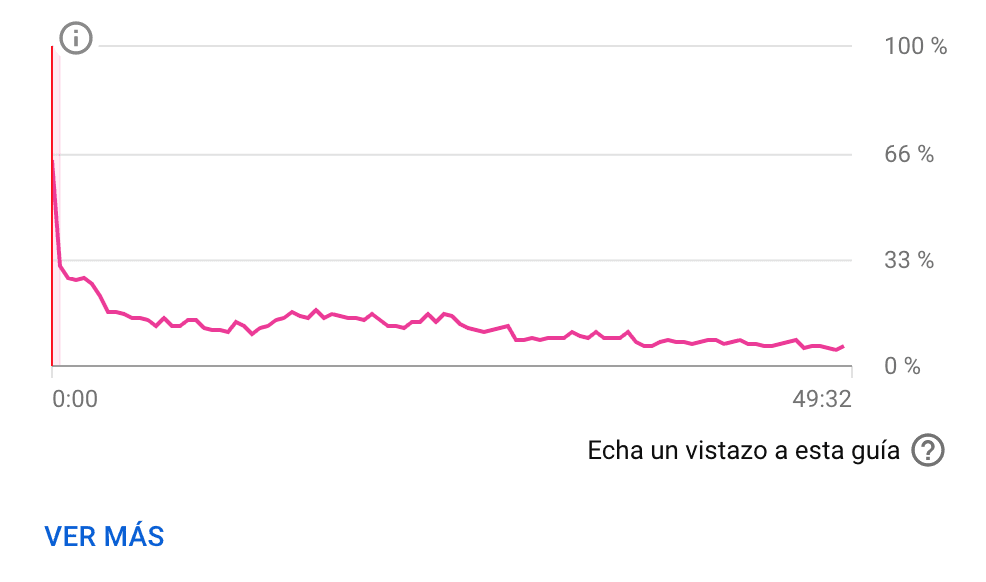
REMEMBER! If you're not funny… Entertaining isn't just making people laugh; it's getting people to immerse themselves in your video and not remember what they were doing before.
12. Get the video length right
How long should a video last?
Easy.
What the user is willing to watch.
Hints: what is positioning?
If a video is well positioned, its retention will be high, so it can be an
appropriate duration..
But...
If your video is longer and you still retain people, you WIN. That is, you have more
viewing minutes and a high retention percentage, something that will improve your video positioning on Youtube.
13. Use the "community" tab
To be able to use the community tab you'll need to have more than 1000 subscribers.
Posts from "Community" will be sent to all your subscribers in the
subscriptions tab. Even if they don't have the bell.
The content you can upload can be:
- Notify when a video will be uploaded
- Notify of a new video in case Youtube hasn't notified them or they haven't seen it
- Promote social networks
- Questions
- What time do they want to see your videos?
- In what way or format?
- What do they want your next video to be?
- etc
14. Try to understand
the YouTube algorithm yourself
Test, test and test again. You learn through tests, through errors. Try to understand how the Youtube algorithm thinks by collecting data from all these tests and optimize your videos according to what you've found out.
For example:
To appear on the "YouTube home page"
The metrics obtained when viewing the video only from the YouTube home page are taken into account (clicks, retention...).
Traffic from external sources
Link your video in a post, tweet it, share it to your newsletter, move it... This way, from the first minute, your engagement will increase and it will be recommended more.
Main metrics
For your video to be recommended through notifications and home (youtube home page), clicks and retention are the main metrics..
For SEO: other factors are also included like the keyword in the title and first paragraph of the description.
15. YouTube SEO Tools
There are different youtube seo tools but the most generally used are Vidiq and tubebuddy. Both are very similar although each has its strong point, the most recommended in this case is to use both and combine the functions between them (at least that's how I do it).
16. Monetize videos
1. Adsense
A suitable option, but... personally I think it's not the best for "niche" channels.
2. Affiliation
Remember to take advantage of description and highlighted comment for the affiliate link.
3. Own products
If you have an eCommerce or sell services, link to your landings! Obviously products or services must be related to the channel or video theme.
4. Member sponsorship
For that, you need 30,000 subscribers and to be free of warnings for violating policies
Items you can give sponsors:
- Exclusive emojis when they comment
- Exclusive lives
- Exclusive "community" posts
- Access to videos before anyone else
- Make an exclusive telegram channel
- Give a key to access a course on your website
5. Brand sponsorship
In this case it's done through sponsors who pay for appearances in your videos. Normally they're mentioned when starting the video and when ending it and must also be related to the channel or video theme.
6. Merchandising
The brand Teespring.com has agreements with Youtube, something that allows you to sell merchandising through Youtube.
17. Copyright on Youtube
Be careful with strikes
With 3 strikes (infractions), they close your channel
Read the resources https://www.youtube.com/yt/copyright/es/ don't use copyrighted music, otherwise they can sanction you by demonetizing you or giving the revenue to the original owner. In more extreme cases they delete your video.
The use of networks
Companies that advise youtubers on their content and that on occasions can deal more directly with Youtube for Copyright issues (and make exceptions). Normally, networks charge by taking a percentage of the benefits you generate on AdSense.
And brands?
There's a tool that notifies if someone has used their content. However, they warn that commenting or parodying content can be exempt from Copyright.
More Youtube seo positioning techniques
Subscription button
If you add ?sub_confirmation=1 at the end of your channel URL a pop-up will appear for them to subscribe.
Better to use Youtube
It's not frequent for Google to include videos hosted on another website in SERPs. Better to use Youtube, although RTVE has managed it.
The rise of the videopodcast
Interviews and shows that are uploaded both in audio format and video.
I hope you've learned something new. Now it's time to get to work! If you have any doubts, don't forget to leave them in the comments.
Related reading
- How to index your website in Google
- Ranking on Google: technique, content and authority
- Best SEO agency: real criteria
Shall we work together?
If you want to apply this in your company with a team that combines technical SEO, GEO and paid acquisition measured against the income statement, request a no-commitment audit. You can also check real case studies or read the public GEO baselines that Elevam Labs publishes every quarter.