What are meta tags?
Meta tags are an HTML code implemented on the website to give indications to the search engine and help it interpret the content.
It's very important to use these tags well since just as they can help you rank, they can be the ruin of SEO for your website.
Below I leave you the most important metatags to make a difference.
The most important Meta Tags for SEO
In this article I talk about the main meta tags that exist in the SEO world.
How many are there? Are they many? Which is the most important? Can you give me a hint?
As that famous football coach says…
We're going game by game. Meta tag by meta tag.
Let's go!
Meta title
Remember that friend who was the teachers' snitch?
Yes, the one who would run their errands to suck up.
Well, Google plays the teacher and the title tag plays your friend.
Let me explain.
This tag is the one whose mission is to tell search engines the most important topic the page being crawled will address.
But like that mate did, the message has to be something concise. So it's advised not to exceed 70 characters. If you go over that number the result in the SERP will appear cut off, that is, what you're trying to convey won't be fully seen.
Don't forget to use the keyword in the tag, the one you want to rank for. Concisely and that stands out.
So it's well understood at a glance.
An example could be…
<title>Agencia SEO FullSeo | Posicionamiento Web de calidad</title>
As you can see, a short sentence, it's understood and you know perfectly what the page is about.
Like good snitches, short and forceful message.
So when telling it to Google in its ear it doesn't have to say…
Sorry, I didn't understand you.
Meta Description
Unlike with other SEO meta tags, this specific one isn't used by Google to calculate search results ranking.
Buuuuuut….
It can be important for our ctr (relationship between views and clicks) since it appears right below the meta title in the SERP.
And this ctr is something the search engine does fancy. So, don't downplay the meta name description.
Very well Asier, but describe this meta tag to me once and for all.
I'm going.
To put it directly, it's an html tag and its function is to define or clarify what each of our urls is about. Therefore, it helps the search engine better know the content that will be addressed.
Visual example.
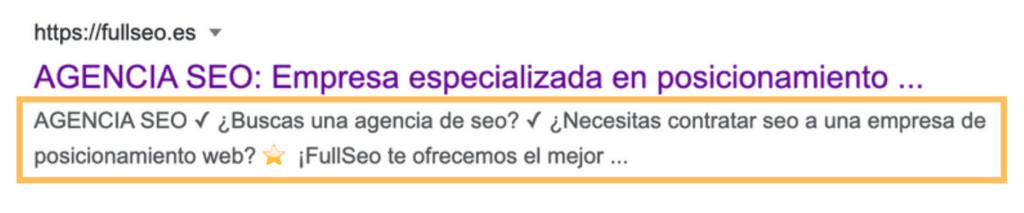
There are applications or tools that help you build a good SEO meta description. Like for example semrush or… (add some asier).
Let's go to the next one!
Hx tags: Heading hierarchy
In this case I simply advise you to use logic when structuring content.
What do I mean?
Following the order h1, h2, h3, h4 is important, since well-organized text pleases both Google and the user.
Therefore, keep in mind that only an H1 should appear and the subdivisions that emerge should be put in order. It can't be that you include an h4 before an h2.
Easy.
On to canonical!
Canonical tag
We can say that canonical is one of the most important of all meta tags.
Why?
I'll tell you.
This meta tag has the function of telling Google which is the original url in case copied or similar urls appear. So as to clarify where we want it to put its focus, its attention.
You can do it this way.
<link rel=»canonical» href=»https://elevam.es/» />
In this case we tell it that the one we want it to look at as not copied is elevam.es/
We'll say that the canonical url is the original.
And the copied or similar one will be the canonicalized.
It's key that you use it well; otherwise Google may choose to give originality to another one you didn't want…
And if that happens, you better call Houston…
ALT tag
When you look at an article, a page, an application or anything online.
Besides text content… What usually appears most as accompaniment or as main element?
Think a little…
Come on, what would you say?
Exactly, images.
Well, this element is also important, hence we talk about this meta tag as something to consider. The alt tag or meta images.
As I keep telling you, we have to make everything simple for Google. And when ranking on Google images we'll use the ALT tag. Which will help the search engine know more about our specific image.
So it seems key.
Although it's a text the user doesn't see, it can appear when an image doesn't finish loading or if some screen reader is used that reads aloud to you.
Example.
<img src=”ejemplo-imagen.jpg” alt=”ESTE ES EL TEXTO ALT” />
And it's that it doesn't just have that weight in gold when ranking on Google images, but we can play with them to introduce the keyword we're working on.
Thus putting more emphasis on it and that it may have more weight when being searched by the user.
As you can see, each tag has its little thing. Don't leave any because you think it's minor and you skip working it.
Everything counts.
To the robots!
Robots meta tag or Meta robots
This meta tag can be important for the following.
Because with this tag you can have control of how to index a page and how to display it to the user in search results.
It's normally used to send negative indications to the crawler about some of your pages. Otherwise the spider takes them as positive.
Phew, what a mess you've made Asier.
Let me explain.
If for example you want it to index a page you don't have to add robots tag, but otherwise yes.
The main (not all) actions you can do with this meta tag are the following.
- Translate - notranslate: Give the option or not to translate the page in question.
- noimageindex: The page's images wouldn't be indexed
- Index - noindex: We can tell the crawlers whether we want them to index or not a specific page. Using noindex we'd say to NOT index and therefore this option doesn't appear in search results.
- Archive - noarchive, Noarchive commands the robot not to store the page content in the search engine's internal cache memory. The archive term would do the opposite.
- Snippet - nosnippet: For the search engine to show only the title with the description or without it.
- Follow - nofollow: In this case upon meeting the spider and talking to it we'd say "keep crawling the links please" or "don't keep crawling, that's enough for today". Using follow or nofollow respectively.
Example.
<Meta name = “robots” content = “noindex” />
We end with another meta tag and move on to its companion.
This doesn't stop.
Open Graph, you're next!
Open Graph
We find on our path the following meta tag, although it's not directly related to SEO, my advice is not to neglect it.
Open graph transmits to social networks the information they can or should give to the user every time our link is shared.
Hopefully many.
You know the importance and traffic we can get through networks; reinforcing our brand on them is a factor that can give you a lot.
They're implemented as follows:
<meta property=”og:type” content=”website” />
<meta property=”og:title” content=”título de tu página o tu post” />
<meta property=”og:description” content=”descripción del contenido de la página” />
<meta property=”og:image” content=”enlace al archive de la imagen” />
<meta property=”og:url” content=”permalink” />
Surely you know very few people who aren't on some of the big social networks. And your ideal customer wouldn't be less, so taking care of the content you give is important.
You know, the power of networks is high.
Like when we talk about the meta refresh direct…Oops, that's already from the next section.
Come on, I'll tell you now!
Meta refresh redirect
In life there are many things better not to use, surely some come to mind.
- Dad's car to go partying.
- Your brother's laptop without warning.
- The drill at 2 in the morning.
- Second-hand condoms.
- Redirect meta tags.
I focus on the last.
First… what is it about?
It simply does the function of telling the browser to redirect the user to a different url after a time. Although Google respects it, it's not very accepted.
Why?
- It's not compatible with any browser.
- It can confuse the user at times, as well as raise security problems.
- Pages are analyzed before the destination url emerges, which can take a while that isn't pleasant.
What can you do?
- Unless it's very necessary, don't use this tag.
- Instead, better use a 301 redirect.
If you really need it and have no other choice, I'll tell you how you can do it.
Paste the code below in the <head> section of your page:
<meta http-equiv = "refresh" content = "5; url =" https://dominio.com/ ">
The content attribute specifies the delay time in seconds. The URL attribute specifies the redirect URL.
Remember, like that time you took dad's car to go partying, that day you had no other choice. It was either that or nothing.
Well with this meta tag, the same.
Meta viewport
Doesn't that thing happen to you of viewing a page or app on mobile and when seeing it on pc it looks a bit crappy?
With the meta name viewport you can let the browser know how you want the page rendered in the different sizes you choose.
Tablet, mobile, pc…
With the viewport meta we're telling Google, for example, that our page is mobile or tablet compatible. Something the search engine values positively when placing your site higher in search results.
It usually happens that when a PC version page is opened on a phone it looks low quality, even making reading or experiencing it difficult.
Therefore, there are serious chances the user abandons the website faster than Road Runner when seeing the coyote.
Beep beep!
What can you do with this meta tag?
- Use it as graphic viewport on all web pages.
- Unless you're very sure of what you're doing, use the "standard" tag
- Paste the
<head>code afterward in your web page's section.
<meta name = "viewport" content = "width = device-width, initial-scale = 1.0">
A detail to consider:
The content attribute doesn't have to be set to width = device-width, initial-scale = 1.0, but it is the most common implementation and the correct one for most pages.
Let's continue then.
Character encoding (Meta charset)
In this case we talk about the letter, the font.
If in the header of the http file we don't leave the font marked, we'll do it using html. Setting aside small problems that may arise, like the ñ or accents not appearing in their correct use.
What meta tag will we use?
<meta charset="utf-8"/>
This section is also interesting in case a browser enters html files from the hard drive and doesn't do or receive it via http.
We continue with instructions to give to robots.
Instructions for search robots
Meta tags have different functions, but one of the most important is giving instructions to crawlers (robots or spiders) for indexing our page.
How to achieve it?
With the meta tag "robots".
Below, I tell you the meta to stipulate whether a page can be indexed and therefore appear in search engines. Key metadata for SEO.
Index
With this indication we're allowing the robot to index our html page.
You don't need to add it since it's the default. If it doesn't have any meta tag telling it otherwise, it will be indexed without needing to put this.
It would be, like this:
<meta name="robots" content="index"/>
Noindex
Watch out!
Only use if we intend a page not to be added to the index, since this meta tag tells Google what it shouldn't transfer to its database.
It would be like this.
<meta name="robots" content="noindex"/>
Data to keep in mind:
- When you use the word "robots" you're talking to all search engines,
- If we only want to address one search engine, you can do it with an optional attribute like "googlebot".
- Remember "noindex" is so it doesn't index the page in question. The one we tell it.
Follow
Normally, search engines will pass through the links of the html page in question. In case you don't deny it, of course.
This, even without being necessary, can be included in a meta tag.
Looking as follows.
<meta name="robots" content="follow"/>
Nofollow
So that a search robot doesn't pass through some subpages we decide, you can use "nofollow" as follows.
<meta name="robots" content="nofollow"/>
In this case the robot will pass over the links, but won't do so with the content. Which yes is stored in the database.
Consider the following.
The Index/Noindex and Follow/Nofollow meta tags can be used alone or combined.
For example.
- In case you want a page to be indexed but for the links to go unnoticed.
- You could also let it do both actions, or none if you prefer.
Like this:
<meta name="robots" content="index,nofollow" />
<meta name="robots" content="index,follow" />
<meta name="robots" content="noindex,nofollow" />
Nofollow doesn't pass strength to the url it points to but we do lose it. Linkjuice is lost into nothing. So we don't lose that linkjuice we'd have to obfuscate links instead of putting them on nofollow. In fact, Google pays less and less attention to nofollow links.
Language Meta Tags
Another of the SEO meta tags I'll talk to you about is language (hreflang).
But Asier. Is it important?
Yes and no.
When would it be?
In case your website addresses different markets and opts for various languages and translations.
When not?
In case the above isn't met.
You'll thus avoid, by telling it your website is in several languages, that the search engine considers those translations as duplicate content.
Something that would take you to penalty, sure thing.
We can do this in a simple way through plugins to create a multi-language website.
The most popular is WordPress's WPML, which I recommend.
Geo Meta Tags
For a time this SEO meta tag was being used to tell Google to determine the location of the website.
But in 2017 they denied that they took this into account for it.
Now, to specify your website in an area or country you can do it through Google Search Console's tool, in its international targeting section.
It will identify hreflang tags and that's it.
Easy and fast.
Rating Tag
How many times a day do you see below some website or product the rating stars?
100? 1000? 100000000?
This tag is in charge of showing those stars, the ones Google shows us in search results.
This is one of the meta tags I like most and that I usually always use on my blog; it helps a lot to highlight the result in the SERP, which improves ctr.
You can do it through the following plugin.
KK Star Rating
Date Tag
With the date tag the date the page was created or uploaded will appear in search results.
Yes, if you have an ecommerce maybe you're less interested in this html meta tag than a manual book to do cross-stitch.
But if you have a blog it can be useful, since the publication date is important for the user.
If you created your website with WordPress I advise "by all means" to use the yoast seo plugin for this function.
Author and copyright
I conclude this article with a 2-for-1.
Two meta tags you can use, but that aren't (so to speak) mandatory. With them we'll be putting who was the designer of a page and on the other hand the owner of the rights to an html page's source code.
I must tell you that…
Author tags are automatically generated in some content systems (CMS), thus naming the person who last worked on said page.
Thus, administrators can easily get from the directory who is in charge of managing the page.
<meta name="author" content="Nombre del autor" />
<meta name="copyright" content="Propietario del copyright" />
Farewell meta tag
Including this meta tag…nothing, joking. We've reached the end, as Porky from the Looney Tunes would say…
That's all, that's all, that's all folks.
I hope all this information is useful to you. Don't forget that if any small doubt comes up or you feel like commenting on something I read you and reply in less than 48 hours.
I'll be happy to do so.
Until next time!
Implications for GEO: meta tags also feed AI
In 2026 meta tags aren't just signals for Google. Generative AI engines (ChatGPT with web search, Gemini, Perplexity, Claude) use part of this information to build their answers:
| Meta tag | How generative AI uses it |
|---|---|
<title> | Extracts it as source title when citing |
<meta name="description"> | Sometimes used as context when AI decides whether the page answers the query |
<meta property="og:title"> and og:description | Appear in shared previews and, increasingly, in aggregators AI consults |
<link rel="canonical"> | Critical so AI doesn't get confused by duplicates when citing |
<meta name="robots" content="noindex"> | Most generative engines respect it; blocks citation |
<meta http-equiv="content-language"> or lang="es" | Helps classify language and market |
Specific recommendations for GEO:
- Unique, descriptive title with clear entity: AI uses the title to identify what the page is about. Avoid generic titles.
- Rich description, not SEO-stuffed: if the user asks "what does X say about topic Y", AI may take fragments of the description before the body if context is ambiguous.
- Correct canonical on all pages: if you have AMP versions, old mobiles or parameter duplicates, AI may cite the non-canonical URL. Result: you lose Share of Mention attributed to your main URL.
- Complete Open Graph: more and more generative engines use OG as fallback when schema.org isn't present.
<link rel="alternate" type="application/rss+xml">: RSS feeds are a common source for aggregators that feed models. If you have a blog, expose the RSS.- Keep
<meta name="author">and combine it with schemaPerson: reinforces E-E-A-T and authorship detectable by LLMs.
Advanced tip: if your site implements non-standard metadata (prerender-status-code, revisit-after, etc.), don't expect AI to use them. Focus on the canonical set: title, description, robots, canonical, OG, schema.
For a complete view of how to build an AI-ready data layer, check how to expose your data to AI with schema, feeds and entity.
Shall we work together?
If you want to apply this in your company with a team that combines technical SEO, GEO and paid acquisition measured against the income statement, request a no-commitment audit. You can also check real case studies or read the public GEO baselines that Elevam Labs publishes every quarter.