Indexing your website in Google is the enrollment of SEO. If your website isn't indexed, for the search engine it doesn't exist. Just like that.
Imagine you want to study for a degree, but you don't submit your enrollment. You can study at home, buy books, write summaries… but if you're not registered, you can't take exams. Same thing happens with Google: if it doesn't index you, you don't compete.
When we talk about indexing, we're talking about "publishing" your page within the index of engines like Google, Bing or Yahoo. Before ranking anything, Google passes through your website, detects pages and links, and decides whether it's worth saving them in its index. If it indexes you, it's telling you: "now yes, you can appear someday".
Important: indexing is not ranking. You can be indexed and not rank, but you can't rank if you're not indexed.
And a nuance for 2026: if you want your content to have options of being retrieved in AI experiences (hybrid engines, generative answers, etc.), indexing is still the basis. If Google doesn't discover you, you don't exist in the first filter. If you're interested in that next level, here's the GEO service: https://elevam.es/geo/ and the consultancy: https://elevam.es/ia-geo/.
That's what this article is about: how to check if you're indexed and how to help Google not overlook your website. Coming with us?
What is indexing?
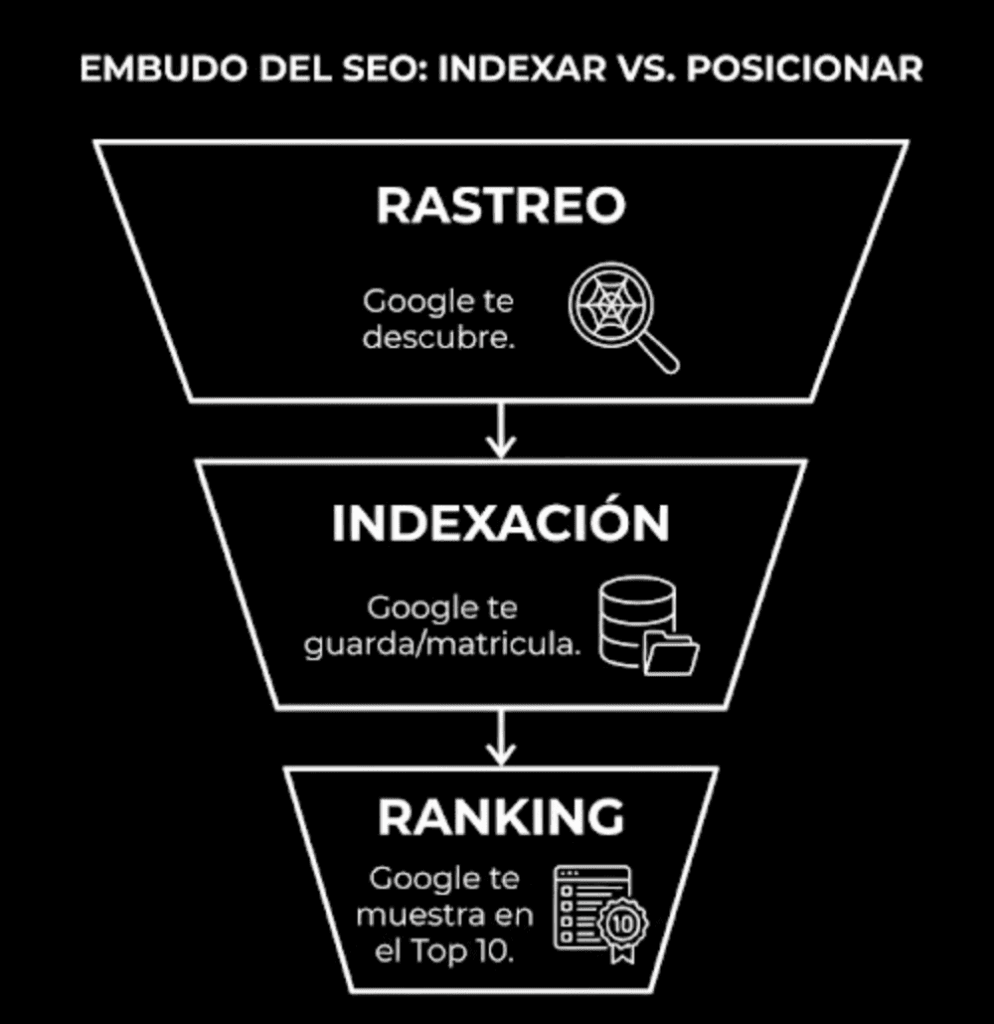
Indexing is the process by which Google adds a page to its index. To get there, it first discovers it (crawling), then interprets its content, and then decides if it saves it (indexing). Only then can it appear in results.
Google crawls trillions of URLs. So your job is to make it easy for it: clear structure, internal links, sitemap, no blocks, no duplicates, and content that deserves to be saved.
How to know if my page is indexed?
You have two methods: a quick one (to get by) and a reliable one (to really diagnose).
Method 1: check indexing with "site:" in Google
Go to Google and type:
site:yourdomain.com
Example: if your website were mueblesdecocina.com, you'd put:
site:mueblesdecocina.com
The pages that appear as results are, in principle, indexed URLs. Normally the first is the home. If your domain doesn't appear, it can be because:
- Your website is too new and Google hasn't detected it yet.
- There's some block (robots/noindex) or a technical problem.
- Or, in rare cases, a penalty or filter (don't assume this without evidence).
If you want to check a specific URL, do the same but with the path:
site:yourdomain.com/your-url
Example:
site:mueblesdecocina.com/pared
If the snippet of that URL appears, it's indexed. If it doesn't appear, it may not be indexed… or there may be other reasons. That's why the serious method is Search Console.
Method 2: check indexing with Google Search Console (the reliable one)
Google Search Console is a free tool to control how Google sees your site: indexing, errors, performance, security, etc.
To check if a URL is indexed:
- Enter Search Console.
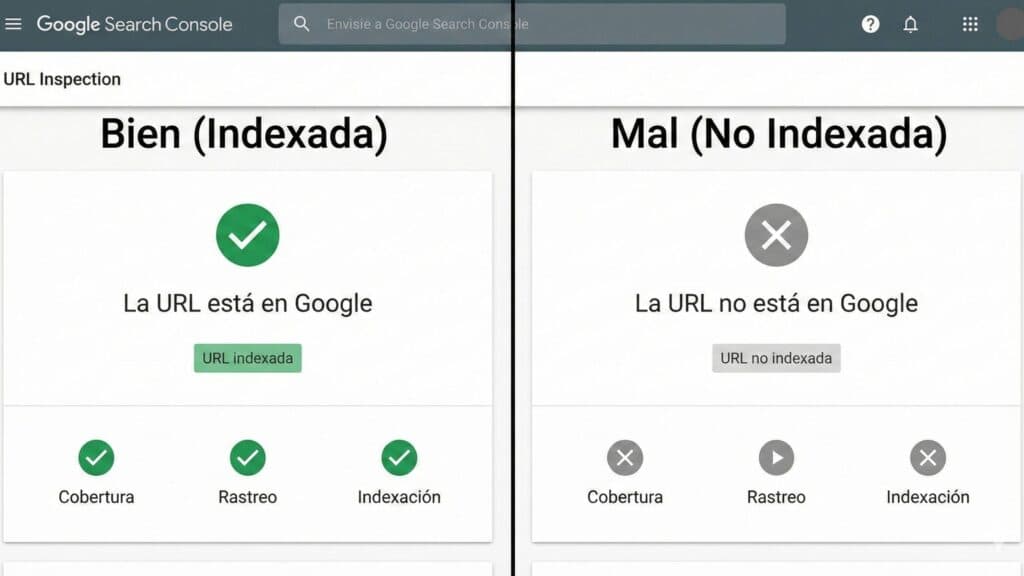
- Go to URL Inspection.
- Paste the exact URL.
- The tool will tell you if it's indexed or not, and why.
This is the truly "easy and fast" way: you don't guess, you see it.
What process do search engines follow to index a website?
I'll sum it up in three phases, because understanding the process tells you where it breaks.
- 01
Crawling
Google's crawler is called Googlebot. Its job is to discover new pages and changes on existing pages. It does so in two ways: finding pages linked from sites it already knows and receiving hints through your sitemap and internal structure.
- 02
Indexing
Once it crawls, Google analyzes and interprets the content. If it decides it's worth it, it adds it to its index. That's: "you're now enrolled".
- 03
Publication and ranking
When a user searches, Google queries its index and decides what to show with its algorithms. That's why Google won't give you a motorcycle website if you search "yoga for beginners". It can show websites, images, videos, maps… depending on intent.
How to manually index a page in Google?
You can request indexing from Search Console. It's not magic, but it helps to speed up the process if your base is fine.
Index with Google Search Console (step by step)
Recommended process:
- Sign up for Search Console and create/verify the property.
- Submit your sitemap (below I'll explain what it is and how to check it).
- Go to URL Inspection and paste the URL to index.
- Click on Request indexing (if available).
Two truths: SEO and immediacy aren't good friends. Sometimes it takes time, and sometimes Google crawls and decides not to index if it detects weak signals (thin content, duplicity, low utility).
External tools to "index fast": One Hour Indexing and Link Centaur (and why you should be careful)
There are tools like One Hour Indexing or Link Centaur usually used in black hat to speed up indexing of external pages where you have a backlink and want Google to discover it fast.
They aren't tools verified by Google. You don't know exactly what they do behind the scenes. So, for your own website, the sensible recommendation is clear: don't turn this into your habitual method. If you ever need to urgently index a URL, do it very carefully and only as a one-off measure. If you abuse it, you can get into trouble.
The correct strategy to index is the "natural" one: structure, crawlability, sitemap and quality. The rest is a patch.
How to index my website in Google naturally?
Requesting indexing works, but if there are blocks or "little things that aren't right", you'll fall into the black hole of the non-indexed. This is what you have to review.
1) Check the robots.txt
A poorly configured robots.txt can block crawling. To see it, go to:
yourdomain.com/robots.txt
A typical block that kills any project is:
User-agent: *
Disallow: /
That's telling Google: "don't crawl anything".
If you want a very complete guide (WordPress), here's an external resource: https://raiolanetworks.es/blog/mejor-robots-txt-wordpress-manual-explicativo-del-robots-txt/
If the block affects a specific URL, Search Console usually tells you. In URL Inspection, check the coverage and look for something like:
"Is crawling allowed?" No: blocked by robots.txt
Solution: review related Disallow rules and remove the ones blocking what you do want to index.
2) Check that the pages you want to index are NOT noindex
This is very common, especially in WordPress.
Method 1: noindex meta tag
If in a page's <head> something like this appears, Google won't index it:
<meta name="robots" content="noindex">
<meta name="googlebot" content="noindex">
The keyword here is "noindex". If it's there, it's not indexed. If you remove it, indexing is allowed.
If you want to locate pages with noindex at scale, you can use a crawl (for example in Ahrefs Site Audit) and check the indexability report.
Method 2: X-Robots-Tag (HTTP header)
Another way to block indexing is with the HTTP header X-Robots-Tag: noindex, configured on the server (PHP, .htaccess, hosting). Search Console usually shows it like this:
"Is indexing allowed?" No: "noindex" detected in the HTTP header "X-Robots-Tag".
This is more technical. If you don't have it under control, better that someone who knows reviews it.
3) Create and review your sitemap (and submit it to Search Console)
The sitemap is the map of your website. Just as a 1200-page book needs an index to make queries, your website needs a sitemap to make the crawlers' job easier.
Normally you find it at:
yourdomain.com/sitemap.xml
In WordPress it's usually an index of sitemaps, for example:
yourdomain.com/sitemap_index.xml
In Search Console, submit the sitemap and check if the key URLs are inside. A typical symptom in URL Inspection is:
"URL is not on Google" and "Sitemap: N/A"
That usually indicates that URL isn't in the sitemap or hasn't been well discovered.
You can also check it manually by opening the sitemap and looking for the URL.
Can I notify Google that I've updated the sitemap?
The ping exists:
http://www.google.com/ping?sitemap=<complete_url_of_sitemap>
Example:
http://www.google.com/ping?sitemap=https://example.com/sitemap.xml
If everything's fine, it usually responds with something like "sitemap notification received". It's not magic, but it helps to notify changes.
4) Check misconfigured canonicals (duplicate content and "stuck" URLs)
Duplicate content isn't just copying text. It's also having several URLs that show the same:
domain.comdomain.com/http://domain.comhttps://www.domain.com
If Google sees duplicity, it can index the "wrong" URL or distribute signals. To solve it the canonical exists: you tell Google which is the main version.
Example:
<link rel="canonical" href="https://domain.com/main-url" />
In ecommerce this is critical due to variants (sizes, colors). The idea is that Google indexes the main listing and not each variant as if they were different pages.
5) Check if any page is orphan
An orphan page doesn't receive internal links. Neither Google nor the user discovers it by browsing your website.
How to find them: tools like Screaming Frog let you crawl your site and see which URLs don't have incoming internal links.
What to do:
- If you're not interested: delete and redirect to the most relevant.
- If you're interested: link it from an accessible and related page (and make sure it's in the sitemap).
6) Check internal nofollow links to pages you want to index
A link with rel="nofollow" tells bots that, in principle, they shouldn't follow that path to crawl. The user can click, but the crawler can ignore it.
If you detect indexable pages that only receive nofollow internal links, decide:
- If you want it to index: remove the nofollow on relevant links.
- If you don't want it to index: leave nofollow and/or add noindex.
- If the page adds nothing: delete it or consolidate it.
7) Create good interlinking (internal linking)
Google discovers content by crawling links. If you don't link a URL, it's easy that it doesn't find it or doesn't prioritize it.
From where to link? Ideally from strong and related pages. No need to obsess, but if you can link from pages with more internal authority, better.
Practical trick: after adding the internal link, inspect the source page in Search Console and request indexing. This can speed up the crawling and, with it, the discovery of the target URL.
8) Avoid duplicate content (really)
Simple rule:
- Don't copy external content (not even a paragraph) "because nobody's going to find out anyway".
- Don't have several URLs for the same without canonical/redirection.
- If they copy you, ask for removal or at least a link to your original (when feasible).
9) Linkbuilding (only as accelerator, not as crutch)
An external link can help Google discover a URL sooner. But don't confuse it: indexing shouldn't depend on paying for links.
If you need links so Google "finds out you exist", the real problem is usually in your architecture and internal linking.
10) Avoid thin content and take care of the crawl budget
Thin content is content that doesn't solve anything. It's not "fewer than X words", it's "low utility". There can be short pages that are excellent and long pages that are empty.
If your website is full of low-utility pages, you can affect the crawl budget: the time/resources bots dedicate to crawling your site. If the bot spends the day crawling trash, it dedicates less to what matters.
Think of it as two bars:
- Loli Bar: sandwich from four days ago, no menu, no options.
- Manoli Bar: clear menu, fresh product, solves your hunger.
Google wants to be the Manoli Bar for the user: results that solve. If your website looks like the Loli Bar, don't expect love in indexing or in rankings.
How to index a website on other search engines
Index website on Bing
In Bing the general logic is the same: natural crawling + sitemap + good structure. If you follow the previous steps, normally Bing will discover and index your site. The key is not blocking crawling and having a clear architecture.
Index my website on Yahoo
In practice, applying the same steps (crawlability, sitemap, correct noindex/robots/canonical) is usually sufficient. If Google can crawl your site well, other engines normally can too.
Frequently asked questions about indexing a website
Do you have to index a page in Google to rank?
Yes. You can't rank if you haven't indexed your website in Google. Indexing is a necessary condition, not sufficient.
How to upload a website to Google?
"Uploading" in this context is getting Google to discover and index it. Do it with sitemap + internal linking + Search Console + review of blocks.
How to make Google read a text for me?
First: it must be able to crawl it. Second: it must index it. If it's blocked by robots/noindex or it's irrelevant/duplicate, Google may crawl it and still decide not to index it.
What to do if my WordPress page doesn't appear in Google
Check the typical: the "discourage search engines" checkbox, noindex in your SEO plugin, robots.txt, sitemap submitted and internal links. WordPress usually fails due to a simple configuration.
How to make your blog appear in Google
Exactly the same: crawlability, sitemap, internal links and content that deserves indexing. If you want Google to index fast, avoid orphan pages and thin content.
Before closing: a reality that saves you frustration
If your website doesn't get indexed, it's almost always due to blocks, weak architecture, duplicity or low-utility content. Asking for indexing without fixing that is like asking for an exam without enrolling.
If you want us to review it with criteria (and not with "loose tips"), the normal thing is to audit crawling, indexing, architecture, canonicals and quality. In projects where SEO is the base for presence in AI, this usually starts from consultancy: https://elevam.es/ia-geo/
Editorial note: Why have we published this?
Because a pattern still exists that makes us all waste time: trying to "rank" without existing in the index.
And, in parallel, looking for shortcuts (external indexers, bought links, tricks) to force visibility without fixing the basics: sitemap, robots, canonicals, internal linking and minimum quality.
We're publishing this guide to set the order of the game: first you exist (indexing), then you compete (SEO), and only afterwards do you aspire to dominate comparisons, shortlists and recommendations in AI ecosystems. If you skip the first step, the rest is noise with budget.
Implications for GEO (generative AI engines)
Indexing in Google is a necessary but not sufficient condition for your brand to appear in answers from ChatGPT, Gemini or Perplexity. Generative engines have their own "indexing filter" that works differently:
- RAG pipelines with real-time retrieval (Perplexity, ChatGPT Search, Gemini with grounding) do cross-reference your content at the time of the query. If you're indexed and rank, there's more probability they'll cite you.
- Pretraining (what the model already knows without searching) depends on consistent mentions in high-authority sources during the training cutoff. Indexing well today helps future trainings.
- Schema.org and structured data are signals AI processes better than free HTML. If your page is indexed but doesn't have
Article,OrganizationorFAQPageschema, you lose interpretability.
Concrete recommendations so your indexing also contributes to GEO:
- Verify indexing + authority: an indexed URL that nobody reads or links to has zero probability of being cited by an AI.
- Add schema.org to all pillar pages:
Organization,Article,BreadcrumbList,FAQPage. - Implement
llms.txtat your root (/llms.txt) with a curated map of your most relevant content. Cost: less than 1 hour. Detail in exposing data to AI with schema, feeds and entity. - Measure GEO with quarterly baselines: Elevam Labs public baselines show how to measure Share of Mention, citation and URL attribution.
- Keep
dateModifiedupdated inArticleschema when you refresh content. LLMs penalize apparently stale content.
The rule is simple: if Google doesn't index you, no LLM will cite you with confidence. But being indexed doesn't guarantee anything. Indexing is the floor; topical authority and citable structure are the walls.
Shall we work together?
If you want to apply this in your company with a team that combines technical SEO, GEO and paid acquisition measured against the income statement, request a no-commitment audit. You can also check real case studies or read the public GEO baselines that Elevam Labs publishes every quarter.