Removing obsolete content is common in SEO. The problem is that doing it wrong can hurt your organic ranking: cannibalizations, loss of authority, crawl errors, accidental disappearance of URLs that were actually contributing to business… and the classic "we deleted things and now traffic dropped".
In this guide you'll see when it makes sense to deindex, why to do it, how to check if a URL is indexed and 9 different ways to remove a URL from Google's index (including mass deindexing and image deindexing). The idea is for you to choose the right method for your case without improvising.
Why deindex one or several URLs from Google
Before we explain how to deindex a Google page, let's sort the reasons. If you don't know the "why", you'll pick the wrong method.
Reason 1: You have malignant cannibalizations
A cannibalization happens when two URLs on your site compete for the same keyword (or, more precisely, the same intent). Google splits signals between them instead of concentrating on one. Result: neither ends up strong.
The usual solution here isn't just "noindex". The solution is usually to consolidate: leave a canonical URL that keeps the ranking and redirect the other.
In practice, the cleanest way is a 301 redirect from the URL you DON'T want to rank to the URL you DO want to rank.
Important nuance (from the original post, and still true): there are cannibalizations that aren't bad. If you're 1st and 2nd with two different URLs, it can be acceptable. If you're 7th and 8th, consolidating usually helps you go up.
Reason 2: Don't waste crawlers' time (crawl budget)
Googlebot (and other crawlers) have a crawl budget. When the time/resources assigned to your site run out, they leave. If your site forces the bot to crawl pages you don't care about, you're wasting that capacity and slowing down indexing/crawling of important pages.
In that case, it makes sense to deindex or remove from the index the URLs that don't add value, and arrange architecture/internal linking to guide crawling to what matters.
Reason 3: Obsolete content
If you have old content indexed and it's obsolete today (and doesn't add value), it's usually better to remove from the index. Either you update with criteria, or you consolidate, or you remove. Keeping obsolete pages indexed can generate low-quality traffic and negative signals.
Reason 4: Specific pages that shouldn't be indexed
There are pages that normally shouldn't be indexed:
- Landings created only for Ads campaigns.
- Internal areas.
- Test versions.
- In many cases, certain duplicate legal pages or ones with no search utility (this depends on the project).
The usual solution is noindex. And if they were already indexed, then they need to be deindexed with the right method (we'll see it below).
Reason 5: Canonicalized URLs
When you have very similar pages and apply a canonical tag to the main one (for example, product variations), Google tends over time to deindex the duplicates and keep the canonical. This, well implemented, is normal.
Reason 6: Web/SEO migrations and test environments
Migrations are usually done in a test environment (staging). That site should be in noindex or restricted to prevent Google from indexing the test version.
If Google has already indexed it, it's an urgent case: you have to use Search Console's quick removal and also ensure permanent blocking (noindex / restriction / 401 / etc.).
How to know if a URL is already indexed
Before deindexing, confirm the status. Don't act blindly.
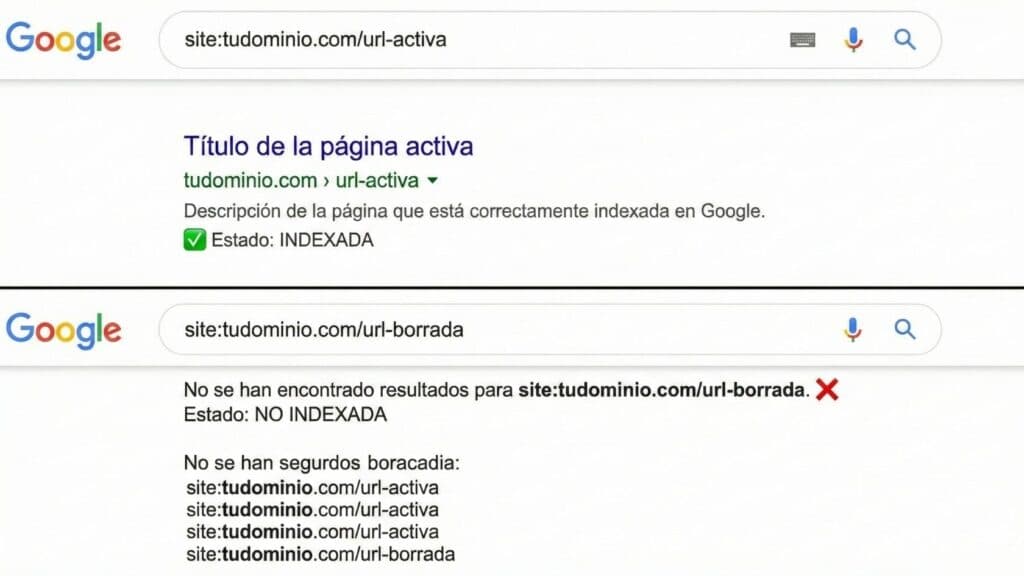
Check a specific URL with the site: command
In Google type:
site:YOUR_URL
Example:
site:mueblesdecocina.com/pared
If it appears, the URL is indexed. If it doesn't appear, it may not be indexed or it may be indexed but not visible due to how Google shows results. For reliable diagnosis, use Search Console.
Check all indexed URLs of a domain with site:
In Google type:
site:YOURDOMAIN.COM
Example:
site:elevam.es
If no results appear, the domain probably doesn't have anything indexed (or almost nothing). If results appear, those URLs are, in principle, in the index.
Check with Google Search Console (the method that rules)
Search Console tells you the real state:
- Enter Search Console.
- Go to URL Inspection.
- Paste the exact URL.
- It'll tell you if it's indexed and why.
Then, if you need to deindex, you'll also do it from here.
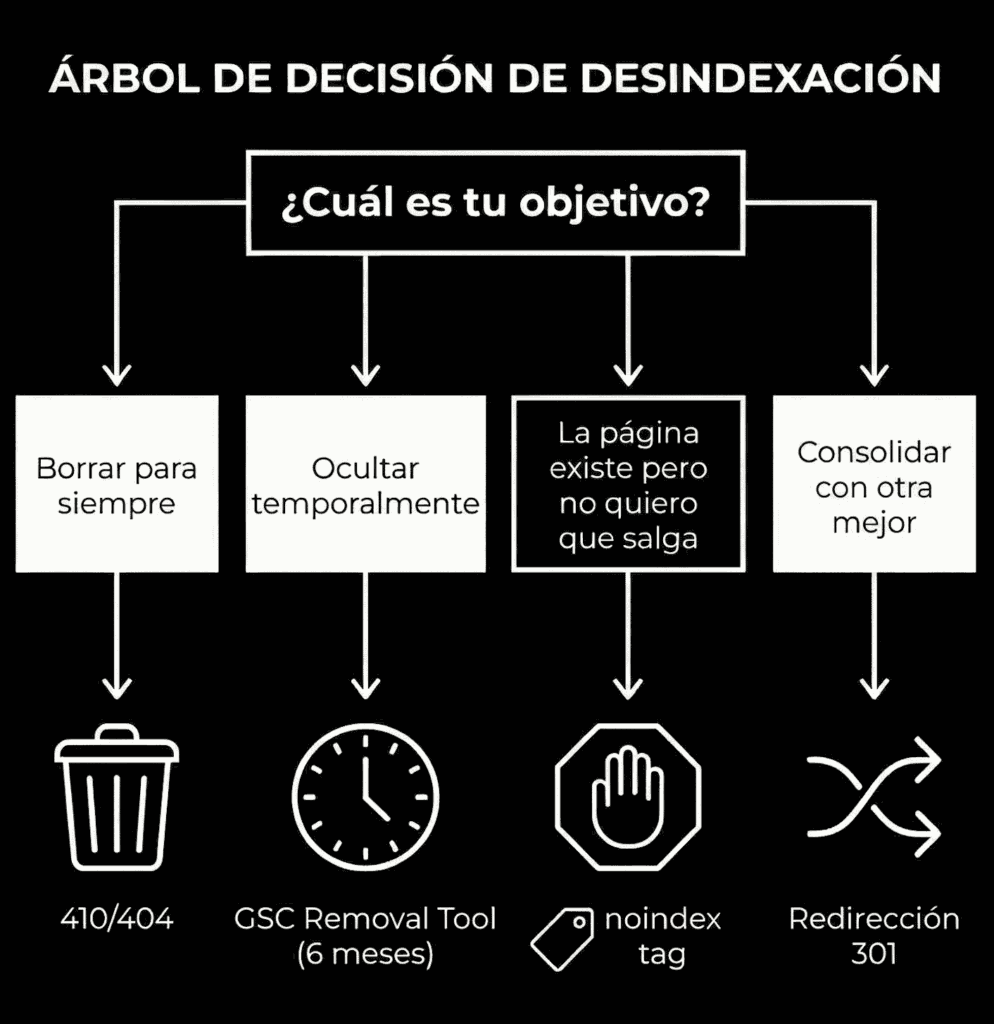
What method to use for deindexing: quick decision table
The right way to deindex depends on whether you want the URL to disappear forever, whether you need to preserve signals (links), or whether it's just temporary hiding.
| Real goal | Best method | When NOT to use it |
|---|---|---|
| Consolidate and pass strength to another URL | 301 to the winning URL | If there's no equivalent or relevant URL |
| Remove definitively (won't come back) | 410 (or 404 if you can't 410) | If the URL may come back or has residual value |
| Don't index, but the page still exists | noindex (meta or X-Robots-Tag) | If you block crawling with robots, Google won't see the noindex |
| Fast hiding in results | Search Console: URL Removal | If you use it as the only method (it's temporary) |
| Block access to everyone except authorized users | Restriction (login/HTTP auth/whitelist IP) | If you need organic traffic or indexing |
| Avoid duplicates from similar pages | Canonical | If you don't fully understand the implications (Google may ignore it) |
9 ways to deindex a URL from Google (or an entire site)
Below you have all the methods from the original article, reordered and better explained, so you choose the right one without losing signals or creating new problems.
1) Search Console "Remove URLs" tool (fast and effective)
In Search Console you can request a URL's removal from the index. It's the fastest method to "take it out of sight" when there's urgency.
Steps:
- Enter Search Console.
- Go to Index → Removals (or "URL Removal").
- Click New Request under Temporary Removals.
- Enter the URL to remove (or the prefix if applicable).
- Send the request.
Important: this removal is temporary. In the original post you say it clearly and we keep it: it lasts 6 months. After that, Google may re-index the URL if it's still accessible and there's no permanent measure (noindex/404/410/restriction/etc.).
Translation: use Search Console to accelerate, but always accompany with a permanent measure if you don't want it to come back.
2) Remove the content: leave it as 404
If you delete the page, it'll return 404 (not found). When Google crawls several times and confirms it no longer exists, it'll eventually deindex it.
If you can't delete the page (because it must exist for users), this method isn't your best option.
3) Add status code 410 (stronger than 404)
410 means "Gone": the page has permanently disappeared. It's more explicit than a 404, which could be interpreted as a temporary error.
If you know that URL isn't coming back and you want to accelerate deindexing, 410 is usually more direct.
4) noindex tag (meta robots or X-Robots)
The goal of noindex is to tell the search engine: "you can crawl this page, but don't index it".
Example of meta robots noindex:
<meta name="robots" content="noindex">
Two critical points (from the original, and fundamental):
- Crawlers must be able to access the page to see the noindex.
- If you block the URL in robots.txt, Google may not see the noindex and deindexing gets complicated.
When noindex may not be your best solution:
- If users shouldn't access either (better restriction).
- If you need to consolidate signals/links (better 301 or canonical depending on the case).
5) Disallow in robots.txt (more "prevent" than "cure")
robots.txt blocks crawlers' access to a URL or section. It works to prevent crawling, but it's not the most reliable method to deindex if the URL is already indexed.
Important warning: if a URL is in noindex but you block it in robots, Google can't enter to see it and may take longer to deindex. This combination is usually a bad idea.
Use it mostly to prevent indexing of entire sections (e.g., internal resources), not as the main deindexing solution.
6) X-Robots-Tag HTTP header: noindex
It's equivalent to noindex, but applied in HTTP header (useful in pre-production, PDFs, or server-level rules).
HTTP/1.1 200 OK
X-Robots-Tag: noindex
If you have a staging or a section that must be accessible but not indexable, it can be a solid option.
7) Access restriction (login / HTTP auth / IP whitelist)
If your goal is for certain users to access but search engines not to, this is the right family of solutions.
Typical options:
- Login system.
- HTTP authentication.
- IP whitelist.
It's used mostly in internal networks, private areas and test environments. If properly restricted, Google shouldn't index.
8) Canonicalization
When a page is a duplicate or very similar to another, you can use the canonical tag to indicate which is the main version.
Important nuance from the original: canonical isn't a directive, it's a signal. Google can ignore it.
Example:
<link rel="canonical" href="https://yourdomain.com/main-url" />
Use it to manage duplicity (variants, parameters, versions). Don't use it as a hammer for everything, because a misplaced canonical can wreck your ranking.
9) Mass-deindex via sitemap
When you want to deindex many URLs, waiting for Google to crawl them "when it's their turn" can be slow. The original's approach is correct: you can speed up the process by forcing crawling with a specific sitemap.
How to do it:
- First apply the permanent measure on each URL (noindex, 404, 410, etc.).
- Then create a specific sitemap with those URLs (or include them in the main one if there are few).
- Submit it in Search Console so Google crawls them more frequently.
- When most are already deindexed, leave the sitemap as it was.
This method is especially useful in big cleanups, migrations and thin-content cuts.
Deindexing images
To remove images from Google, the most common method is to block image crawling with robots.txt for Googlebot-Image. In the original post you frame it this way, and we keep it.
Deindex a single image
User-agent: Googlebot-Image
Disallow: /relative-image-url.jpg
Deindex all images
User-agent: Googlebot-Image
Disallow: /
Practical note: this can take time to take effect. It's not instant.
Frequently asked questions
Is removing a URL from Google's index the same as deleting it?
No. You can remove (temporarily) with Search Console, you can deindex while keeping the page (noindex), or you can delete it (404/410). They're different goals with different consequences.
Which method is better: noindex, 404 or 301?
Depends on the goal: if you want to consolidate and pass signals, 301. If you want to remove definitively, 410 (or 404). If the page must exist but not be indexed, noindex (meta or X-Robots).
Can I use robots.txt to deindex?
As a main method, it's not the most reliable. robots.txt blocks crawling; if Google can't see the signal (noindex/410/etc.), it may take longer. It's better to prevent than to cure.
When does it make sense to use Search Console's removal tool?
When you need fast hiding. But remember: it's temporary (6 months). Accompany it with a permanent measure if you don't want it to come back.
Before touching anything: the most expensive mistake
The typical mistake is deindexing to "clean up" without understanding intent and signals. If a URL has links, useful traffic or fulfills a function in architecture, deleting it without consolidation can cost you more than keeping it.
Quick rule: if the URL had value, consolidate (301 to the best). If it was junk, delete it (410/404). If it must exist but not be indexed, noindex. And if you need to hide right now, Search Console as accelerator, never as the only solution.
Editorial note: Why have we published this?
Because deindexing is being used wrong: people deleting pages randomly, blocking with robots.txt without understanding consequences, or temporarily removing in Search Console thinking it's forever.
The result is the same: loss of ranking due to avoidable errors and a false sense of "we did maintenance".
We publish this to set criteria and order: deindexing isn't a button, it's a strategic decision. If you do it with method (intent, consolidation, signals, crawl budget), you clean without breaking. If you do it on impulse, you shoot yourself in the foot.
Related reading
- How to index your site on Google
- Ranking on Google: technical, content and authority
- Best SEO agency: real criteria
Shall we work together?
If you want to apply this in your company with a team that combines technical SEO, GEO and paid acquisition measured against the income statement, request a no-commitment audit. You can also check real case studies or read the public GEO baselines that Elevam Labs publishes every quarter.